
We are sorry to see you go. Please let us know what stands behind this decision.
You will need to stop and uninstall BitNinja from the server first#
- Use
service bitninja stopcommand to stop BitNinja on the server - To remove BitNinja you can use these commands:
- Debian based distribution:
apt-get purge 'bitninja*' - Rpm based distribution:
yum remove 'bitninja*'
- Debian based distribution:
- Removing BitNinja from WHM:
wget -qO- https://get.bitninja.io/bitninja-whm.tar.gz | tar -zx && ./bitninja-whm/uninstall - Use the following command to remove SSL certificates:
rm -R /opt/bitninja-ssl-termination - Use the following command to remove the BitNinja logs folder:
rm -R /var/log/bitninja
Then you can cancel your BitNinja subscription from the Dashboard#
- Log in to your BitNinja Dashboard
- On the Servers page select the Grid view and then click on the Modules button
- Click on the "CANCEL SUBSCRIPTION" button.
- Fill out the cancelation survey.

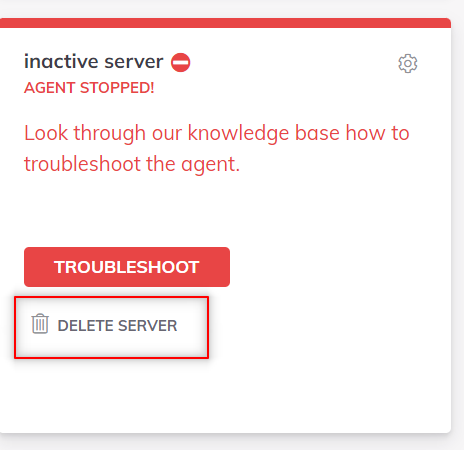
After the health checking service registers that the BitNinja agent is unavailable on the server the box’s color will change to orange indicating the status change of the BitNinja agent (later it will change to red) and then you can delete the sever’s box from the Dashboard.