

The server's load is high due to a denial-of-service attack.
In DoS attacks, multiple connections are established from an IP address, and BitNinja will block the IP address if the number of connections reaches our threshold.
BitNinja blocks most of the infected server's IP addresses via the challenge list or the block list, so most malicious attacks are already blocked.
Fine-tune the DoS module threshold#
- Lower the DoS protection threshold value in the
/etc/bitninja/DosDetection/config.inifile, thus eliminating most of the danger. - Go to
/etc/bitninja/DosDetection/config.ini - Under the [thresholds] flag, you can see the service name and the current threshold enabled.
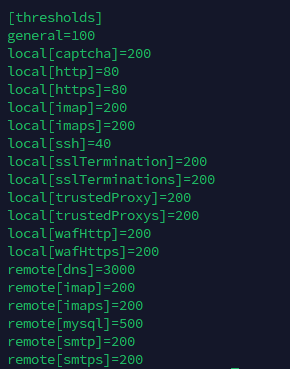
- The default threshold for ports 80 HTTP and 443 HTTPS is 80 connections per IP address. If you want to increase their threshold, then you will need to adjust the following two values in the config.
local[http] = <limit here>
local[https] = <limit here> - Save your changes.
- Synchronize the configuration changes with our cloud using the command:
bitninjacli --syncconfigs - Reload the module with
bitninjacli --module=DosDetection --reloadcommand - Monitor the module logs for detected attacks:
tail -f /var/log/bitninja/mod.dos_detection.log
With the above-mentioned method, you can also adjust these thresholds for the other services listed in the configuration file.
Block IP manually#
You can block IP addresses manually by challenge listing them or block listing them from the Dashboard.
- Go to the Firewall -> Block list menu, and add the IP addresses to your block list, or use
bitninjacli --blacklist --add=<IP address> - Insert the IP into the search field and click on the “+ challenge list" button, or use
bitninjacli --greylist --add=<IP address>