
In case bots are creating spam accounts on your website or trying to brute force an access page. You can just use BitNinja's Browser Integrity Check to block the bots.
If the bots fail the Browser integrity check, their IP will be Challange listed on your account, so they will not bother you anymore.
How to use URL Captcha#
From the Dashboard (New)#
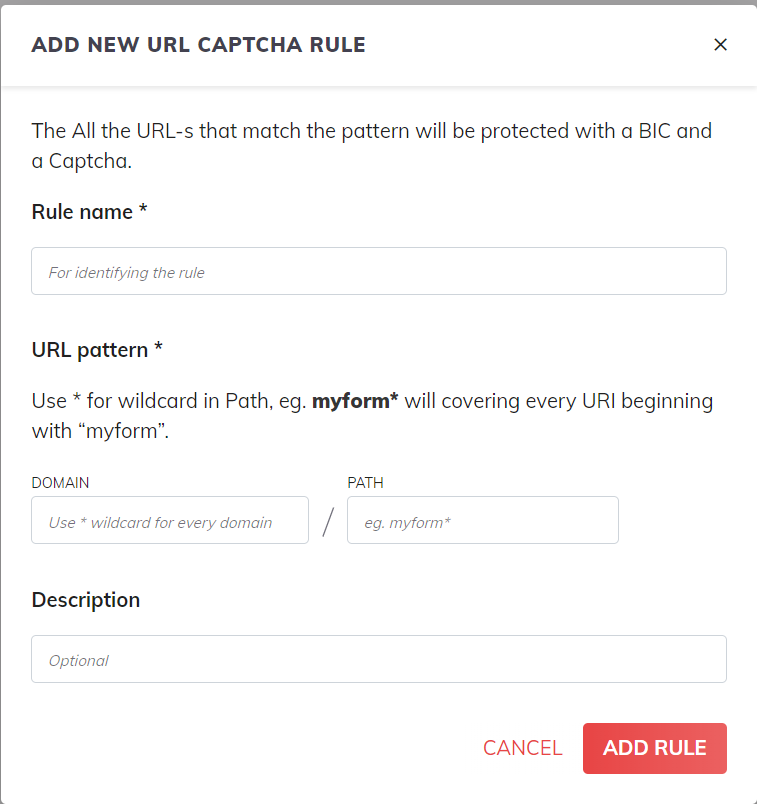
- Navigate to the Firewall menu point and select the URL captcha menu point at the top.
- Click on the "+ ADD new custom rule" button

- Add a name for the rule for identification at "Rule name"
- At the "PATH" text field, add the URI you wish to protect on all domains and on all servers under your account
You can also use regular expressions e.g.: myform* - Add the domain you wish to protect or add * instead to protect the same path on all domains.
- Add a description (Optional but useful in some cases)
- Click on the Add Rule button
You can later edit the rule from the Dashboard by clicking on the pen icon on the rule.
What is Browser Integrity Check (BIC)#
The BIC has the same functionality as the CAPTCHA module. It blocks bots and lets through normal users. BIC does this without requiring the users to type or click anything. Users just need to wait for 5 seconds to pass the Browser integrity check and ONLY at the beginning of their session.
In summary:
- Blocks bots
- Lets through valid users and allow listed bots
- No need to do anything (besides waiting for 5s)
- Users get the BIC page once per session
This is what it looks like:
From CLI (for a specific domain or server)#
You can enable this feature for a specific domain's specific URI on a specific server by issuing this command:
bitninjacli --module=SslTerminating --add-domainuri --domain=<domain> --uri=<uri>For example, on example.com's wp-login page:
bitninjacli --module=SslTerminating --add-domainuri --domain=example.com --uri=wp-login.phpYou can also set BIC to be presented on every domain's wp-login.php URI:
bitninjacli --module=SslTerminating --add-domainuri --domain=* --uri=wp-login.phpHow to disable#
From the Dashboard#
Click on the trash bin icon on the rule.

From the terminal#
To revert the changes a specific domain on a specific URI issue the command below:
bitninjacli --module=SslTerminating --del-domainuri --domain=<domain> --uri=<uri>For example:
bitninjacli --module=SslTerminating --del-domainuri --domain=example.com --uri=wp-login.phpTo revert the changes on all domains for a specific URI:
bitninjacli --module=SslTerminating --del-domainuri --domain=* --uri=wp-login.php